
Connect your KYC & AML screening to your CRM
How the integration works
The technical side falls to your IT team or your CRM provider. Your compliance officer keeps control of everything that touches the checks themselves.
Preparing the data
Everything starts from a shared client reference, usually the CRM’s client number. Both systems then refer to the client in the same way, with no second list of identifiers.
Next comes the field mapping, which takes up most of the project. For an individual, Smart Oversight expects surname and first names, date and place of birth, and nationalities. For a company, the legal name, country, registration number and legal form. You can add an address, contact details, tax information and the risk level you assign to the client.
Your compliance officer confirms which CRM field feeds which Smart Oversight field. The quality of every future screening depends on it.
Connecting the CRM
Your existing portfolio is imported in batches of up to 100 clients. Each client gets its own result, so one incomplete record does not hold up the rest of the batch. It is corrected in the CRM and sent again.
From then on, the CRM sends each new client and each change. Because the client is identified by your reference, the same call creates it if it does not exist yet and updates it if it does. Here is the REST request that creates or updates the company your CRM knows as CRM-88213:
PUT /v2/clients/ext:CRM-88213
Authorization: Bearer <your API key>

{
  "kind": "LEGAL",
  "name": "Acme Holding SA",
  "organization": { "country_of_incorporation": "LU" }
}
Clients you no longer work with are archived, not deleted.
When a client is created, your system requests a screening and chooses the sources: sanctions lists (UN, EU, OFAC SDN and non-SDN, United Kingdom, Swiss SECO), PEP lists and internet search for negative media. Each source has its own status.
Alerts and decisions
Your IT team registers a notification address on your server. Smart Oversight sends a notification (a webhook) there when a screening completes or fails, when an alert is resolved, and when a client is created or updated. Your sales team then sees the client’s compliance status in the CRM.
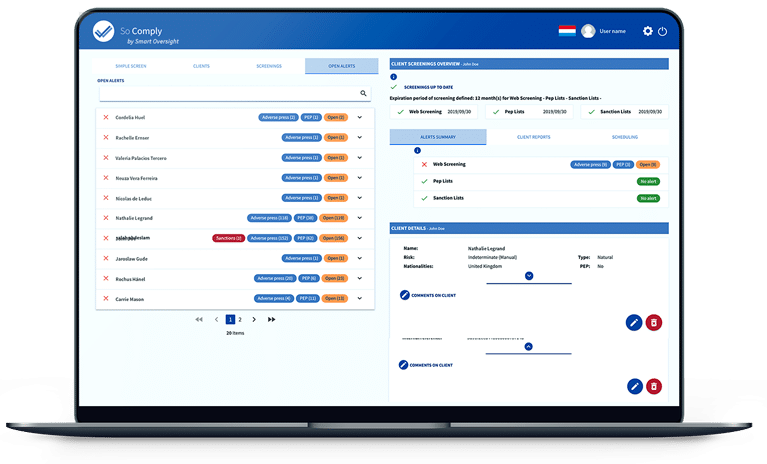
Alerts can be reviewed in the Smart Oversight app, as today, or from your own tools. Each one details the match (name, aliases, dates and places of birth, nationalities, positions, sanction programmes). If your client’s name matches a relative of the listed person, the alert shows the family link (spouse, child, parent or sibling).
The decision comes with a comment and can flag the client as a PEP or report an international or administrative sanction. Made in the app, it is recorded under the name of the signed-in team member. When your tool acts in a team member’s name, Smart Oversight checks that the person belongs to your workspace and checks their role. A decision made in their name can only be validated if they are your MLRO (Money Laundering Reporting Officer).
That leaves periodic monitoring. Your compliance officer sets how often clients are re-screened according to their risk level, for example monthly for high-risk clients and yearly for the others, and your IT team schedules the screenings accordingly.
Before go-live
- One API key per system, limited to the permissions it needs.
- Field mapping tested on a sample of individuals and companies, then approved by the compliance officer.
- Existing portfolio imported, rejected records corrected.
- A notification address registered for each event type you use, with signature checks in place.
- Team members who act through your tools linked to their Smart Oversight accounts.
- A daily reconciliation against the event history.
- A named person responsible for renewing and revoking keys.
Your team receives the full API documentation, generated from the API’s own code. Each feature also has its own article:
- Introducing the Smart Oversight API
- Webhooks for screenings and alerts
- Decisions made through the API carry a name
- Webhooks now cover actions taken in the app
- Indirect matches: see the relative behind an alert
Security
Only an administrator of your company can create API keys, in the Smart Oversight app, and each key has only the permissions you give it. It can have an expiry date, be revoked at any time or be renewed with a transition period during which the old key keeps working. Smart Oversight keeps only a fingerprint of it.
Keys are for server-to-server calls and never leave the server side of your CRM.
Every notification is signed and timestamped, so your system can reject a forged or replayed one.
Frequently asked questions
How long does an integration take?
It depends on your CRM and the state of your client data. Most of the work is the field mapping and testing it on real records. The API calls themselves are few.
Who carries out the integration?
Your IT team, the provider that already maintains your CRM, or our integration partner Deepy Consulting, an IT services company based in Esch-sur-Alzette. The choice is yours.
What does it cost?
Access to the Smart Oversight API is currently included in your subscription at no extra cost. The cost of the integration depends on your tools and on who carries it out. It is estimated case by case.
How much work is it for the IT team?
Calling a standard REST API and receiving notifications. That is routine work for an IT team or a CRM provider, and there is nothing to install on your side.
Can my team keep working in the app?
Yes. Notifications and the event history also cover actions taken in the app. Your CRM stays up to date either way.
Where is our data hosted?
In the region you choose: Luxembourg, Switzerland or another European Union country. It stays there, in Tier III+ data centres located in Luxembourg, Switzerland and France.
What happens if our CRM is down?
Smart Oversight sends the notification again automatically. Your IT team can also resend a delivery from the notification log. Once the CRM is back, it reads the event history to catch up on what it missed.
Where to start
Our integrations page shows what the API covers. To talk about your CRM and how you take on new clients, contact our team. We will plan the integration with your compliance officer and your IT team.
This article is provided for information only. It is not contractual and does not constitute legal advice.
Want to see the full API documentation?
Get the link by email.